Every official letter — registered, routed, signed and answered.
Khitab runs an organization’s official communications end to end — incoming, outgoing and internal transactions, circulars, alerts and announcements. You design the forms and approval workflows without code; letters are generated on your letterhead, signed on screen and tracked until they close.
Seven transaction typesNo-code forms and workflowsAutomatic numbering and barcodesOn-screen signatureFull change logHijri and Gregorian
Signed letterversion 1
Signed · version locked
IN-2026-0023In progress
Registered
Review
Department
Best practice
Built on the best practices approved and applied at NCAR
Khitab is built on the administrative communications best practices approved and applied by the National Center for Archives and Records (NCAR) in the Kingdom of Saudi Arabia.
7Transaction types, each with its own code and numbering
16Field types in the no-code form builder
0Lines of code to design a form, a template or a workflow
2Calendars on every workflow log — Hijri and Gregorian
The problem
Where official correspondence breaks down — and how Khitab fixes it
Most organizations still run correspondence on paper registers, word processors and email threads. Letters go missing between departments, replies lose their thread, and nobody can prove who changed what. Here is what changes with Khitab.
Today
Letters lost between departments
A letter is carried from desk to desk, and nobody can say where it is or who is holding it.
With Khitab
A workflow that carries every letter
Each stage is assigned to a role, a group, an organization unit or a workgroup — and the transaction shows exactly where it stands.
Today
Replies that lose their thread
An answer arrives months later, and nobody can connect it to the letter it answers.
With Khitab
Linked transactions
Link letters as a reference, a reply to incoming or a reply to outgoing — and create the reply straight from the incoming letter.
Today
The same letter registered twice
An incoming letter is entered again by another clerk, and two files grow for one matter.
With Khitab
Checks at registration
The system refuses to register the same incoming letter twice, and checks every required field before a transaction is submitted.
Today
A new process needs a developer
Every new form, approval step or print layout means a change request and weeks of waiting.
With Khitab
Forms, templates and workflows without code
Build forms from 16 field types, design letter templates, and publish approval workflows in versions — all from the screens.
Today
Work that stops when someone is away
Approvals wait on a manager who is travelling, and nobody else is allowed to act.
With Khitab
Delegation with dates
Delegate authority to a colleague for set dates — each delegation shows whether it is active, not started or expired.
Today
Every letter typed from scratch
Staff rebuild each letter by hand, so layouts, logos and wording drift from one department to the next.
With Khitab
Letters generated from templates
Your letterhead, signature and stamp footers and confidentiality notice — filled automatically from each transaction.
Today
Signatures and stamps that need paper
Letters are printed for a wet-ink signature, stamped by hand, then scanned back in.
With Khitab
Signed on screen, labelled by barcode
Sign the generated PDF with a drawn or saved signature, and print a barcode for the paper original — every transaction numbered automatically.
Today
No record of who changed what
When a question comes up, nobody can show which edit was made, by whom, or when.
With Khitab
A complete change log
Every edit to a transaction is recorded with who and when, beside a workflow timeline in Hijri and Gregorian dates.
The transaction journey
From registration to a closed file — on one controlled path
Each transaction follows the workflow set for its form. Every stage has an owner, its own actions and a status — and every action is logged.
01
Register
Correspondence officeSubmitted
Register the transaction, attach and preview the original letter, then submit it into its workflow.
02
Review and route
DepartmentsIn progress
Each stage owner approves, refers, requests information or returns it — with a comment.
03
Generate and sign
Authorized signatoriesApproved
Generate the letter from its template as a PDF, sign it, and keep every version.
04
Close
Correspondence officeCompleted
Link the reply, print the barcode, and close the transaction with its full history.
Returned for changes at any stage — with the reason, and logged
Capabilities
Everything official communications run on
Six areas that follow a transaction from the moment it is registered to the day it is closed.
Transactions
5
Seven typesCorrespondence, incoming, outgoing, internal, circular, alert and announcement — each with its own code.
One home screenA tab for each type, showing the forms each employee is allowed to use.
The original on screenAttach the original letter — PDF, Word, image or email — and preview it without leaving the transaction.
Priority and secrecyFour priority levels and four secrecy levels, from normal to highly secret.
Clear statusesNot submitted, in progress, changes requested, completed, rejected or cancelled.
Workflows
5
Designed stage by stageAssign each stage to a role, a group, an organization unit or a workgroup.
Actions you defineApprove, refer, request information, return or close — with the labels, colours and order you choose.
VersionsSave a workflow as a draft, then publish it as a new version.
Monitor and interveneFollow every running transaction, and restart, cancel or reassign when needed.
Email templatesThe emails each workflow sends, written and managed in one place.
Linking and numbering
4
Three kinds of linkA reference, a reply to incoming or a reply to outgoing — one file for the whole matter.
Reply from the letterCreate the outgoing reply directly from the incoming transaction.
Automatic numberingSet the pattern, starting number and length, and reset yearly, monthly or never — for numbers like IN-2026-0023.
BarcodesPrint a barcode for any transaction and attach it to the paper original.
Forms and templates
5
16 field typesFrom text, dates and lists to file upload, signature, sections and terms and conditions.
Field rulesArabic and English labels, required fields, full, half or third width, and minimum and maximum values.
Letterhead and footersYour logo and header design, with one signature, signature and stamp, several signatures, contact details, page numbers or a confidentiality notice.
Merge fieldsA full editor with Arabic fonts and tables, filled automatically from the transaction.
Page settingsA4 or A3, portrait or landscape.
Signing and documents
4
PDF versionsEvery generated letter is kept as a numbered version you can preview.
Electronic signatureSign with a signature drawn on screen or one saved in your profile.
Signed and watermarked copiesDownload the signed copy, or a copy carrying a watermark.
Change logEvery edit to a transaction — who made it, and when.
Search, notifications and support
4
Search and sortSearch every register and sort by any column.
Notification centerInstant notifications when a transaction reaches you or is acted on — searchable and exportable to Excel.
Support ticketsRaise a technical issue or question, and follow it until it is closed.
Arabic and EnglishA complete bilingual interface with right-to-left layouts.
The product
Designed for the people who register, approve and sign
Real Khitab screens, shown with demonstration data.
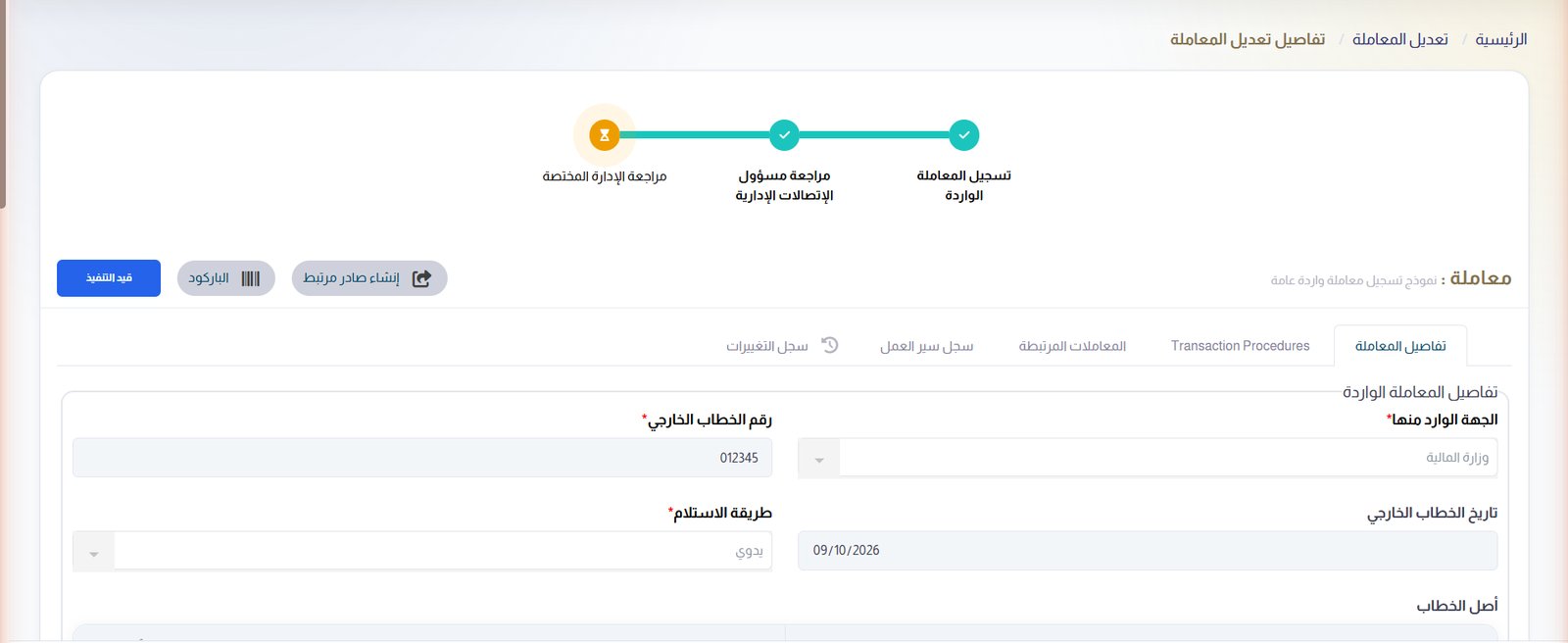
Every transaction, stage by stage
The workflow stages at the top, the current one highlighted — with the letter, its actions, linked transactions, workflow log and change log in tabs below.
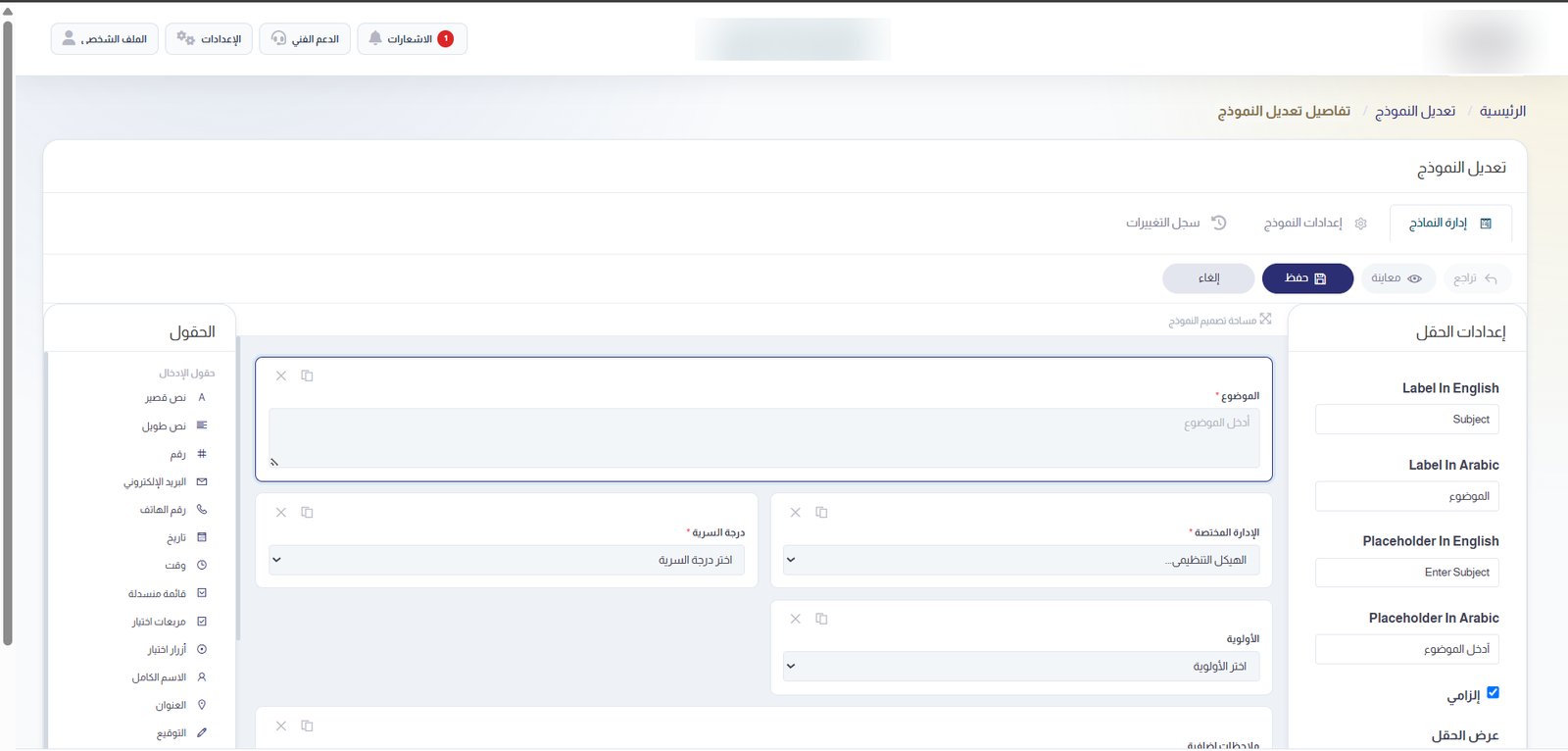
The form builder
Drag fields onto the canvas and set their labels, placeholders and rules in both languages.
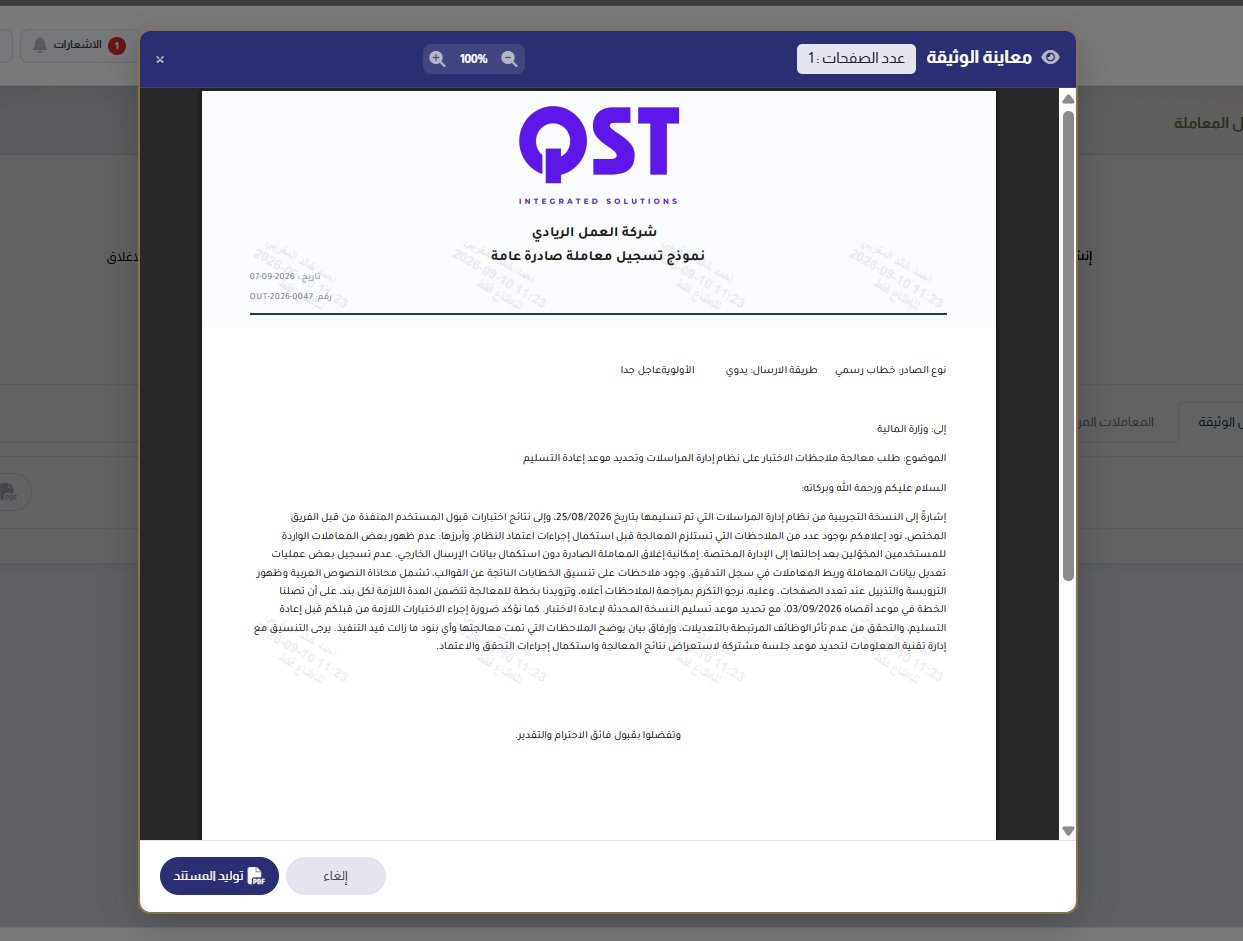
The finished letter
Generated on the organization’s letterhead with its reference number and date, watermarked and marked with its secrecy level.
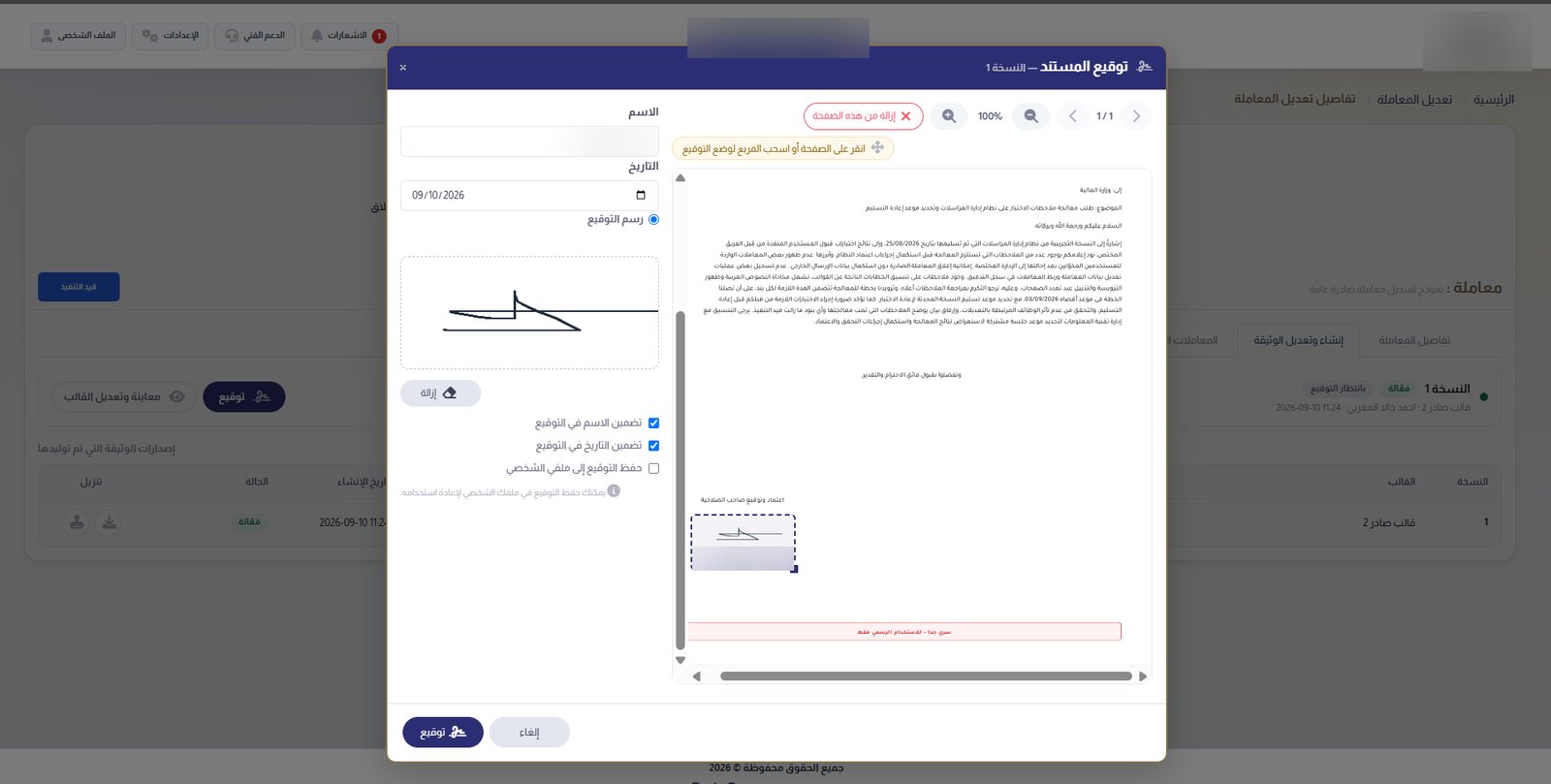
Signing a document
Draw the signature, choose what it includes and drag it into place on the page.
Security and control
Official correspondence, under control from registration to closure
Who can see, act, sign and change is decided by role, structure and clearance — and every action leaves evidence.
Permission matrix
For every screen and feature: view, add, edit all or own only, and delete — per role.
Secrecy clearance
Each user is cleared up to a secrecy level — normal, secret, top secret or highly secret.
Two-step sign-in
An optional one-time code by email at every sign-in.
Dated delegation
Authority is delegated only between set dates, with its status always visible.
Full change log
Every edit to a transaction, with who made it and when.
Roles in the structure
Heads, deputies, coordinators and members in each organization unit.
Watermarked copies
Documents can be issued with a watermark and a confidentiality notice.
Account control
Active, inactive or locked accounts, and temporary passwords for new users.
Arabic and English
A bilingual interface with right-to-left layouts.
Administration
Built on your organization, configured without code
The system follows your real structure, and every rule on top of it is set from the screens — not in code.
Organization structure
Define the levels, then build the tree of departments and sections with their members.
Workgroups
People from different departments in one group with a coordinator — for referrals and circulars.
External organizations
One directory of the organizations you correspond with — government, private or individual, with contact details and national address.
Transaction types
Names, codes and numbering rules for every type of transaction.
Users and roles
Accounts with their clearance, roles and units — filterable and exportable to Excel.
Workflow management
Design, copy, publish and monitor approval workflows, with their emails and return reasons.
Who it is for
Built for organizations whose letters carry weight
Government entities
Official correspondence between ministries, agencies and departments.
Correspondence offices
Registering, routing and issuing letters at volume, without losing a thread.
Executive offices
Letters approved and signed by leadership, with a clear record of every step.
Regulated enterprises
Confidential correspondence that must be controlled and traceable.
See Khitab on your own letters
Live, in about 30 minutes: we register a letter, route it through a workflow, sign it on your letterhead and link its reply.