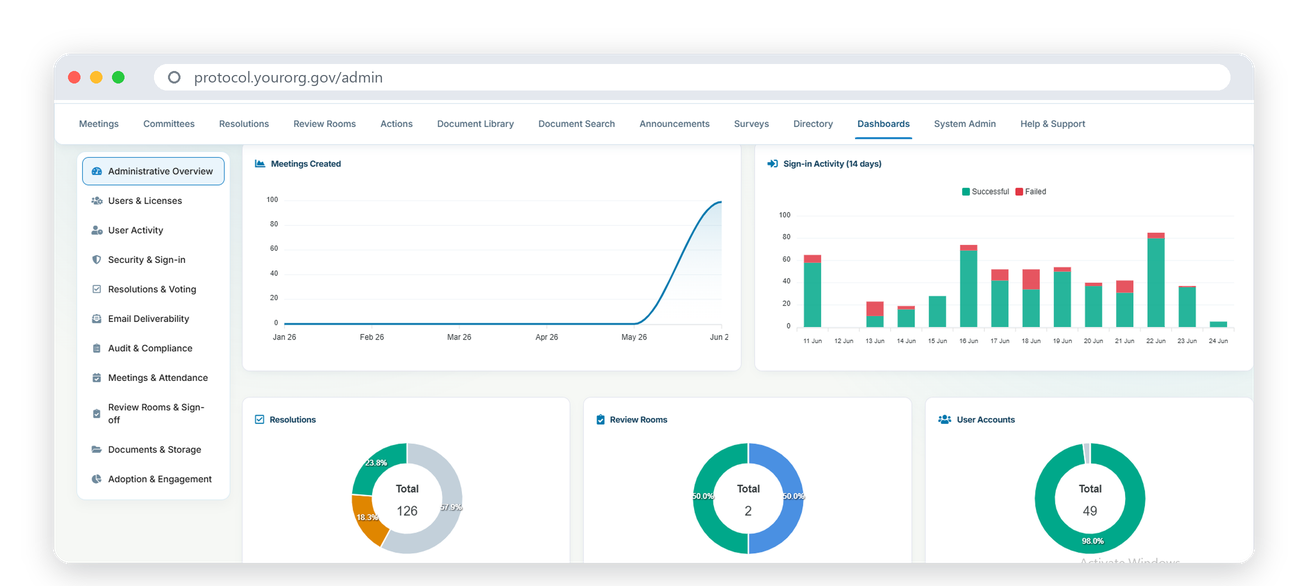
Protocol is a secure, self-hosted smart meeting platform for the whole organization — boards and committees, executive and department meetings, and the calls in between. From agenda to signed minutes, everything runs inside your own infrastructure, and its AI runs locally, so nothing ever leaves for an outside service.
0External cloud, AI or conferencing services required
4Platforms: web, desktop, mobile and room screens
7Layers of security on every request
2Languages — Arabic-first, with full right-to-left
The problem
Where organizational meetings break down — and how Protocol fixes it
Meetings carry an organization’s most important decisions and its most sensitive information — yet most still run on email, shared drives and a patchwork of cloud tools. Here is what that costs you, and what changes with Protocol.
Today
Meeting papers travel by email
Agendas and papers are emailed as PDFs. Versions multiply, late changes are missed, and nobody is sure which copy is final.
With Protocol
One ordered, versioned meeting pack
Build the agenda, attach every document and publish a single pack. Every participant opens the right version, on any device.
Today
Confidential material in someone else’s cloud
Meeting packs, recordings and decisions sit on third-party servers, outside your security team’s control.
With Protocol
Self-hosted by design
Protocol runs in your own data center or private cloud. Your meeting material never leaves your perimeter.
Today
AI that sends your meetings to outside services
Transcription and minute-taking tools upload confidential audio and documents to external AI providers.
With Protocol
AI that runs locally
Minute drafting, transcription, document search and the voice co-pilot run on your own servers. Nothing is sent out.
Today
Meetings on third-party conferencing
Sensitive discussions run through public video services, disconnected from the pack being discussed.
With Protocol
Self-hosted audio and video
Meet and call inside Protocol on your own media servers — video, voice, screen sharing and a laser pointer, with everyone on the same page.
Today
Minutes that take weeks
Organizers rebuild the meeting from notes, drafts circulate for weeks, and the actions agreed in the room are lost.
With Protocol
AI minutes and tracked actions
Draft minutes from the meeting itself — attendance, quorum, every decision and vote — and track each action to an owner and a due date.
Today
Signatures that stall decisions
Decisions wait for wet-ink signatures and couriers, and not every electronic signature is legally recognized.
With Protocol
Qualified e-signature
Vote by circulation, freeze approved minutes into a signable document, and sign with accredited qualified signing through Nafath or Sadq.
Today
Arabic as an afterthought
Imported tools treat Arabic as a translation layer, with broken right-to-left layouts and mixed-language documents.
With Protocol
Arabic-first, throughout
Complete Arabic and English, with right-to-left layout designed in — on web, desktop, mobile and room screens.
Today
No evidence when it matters
When a regulator or auditor asks who saw what and who approved it, the answer is scattered across inboxes.
With Protocol
A full audit trail
Every material change, approval, vote and signature is recorded and reviewable, with fine-grained access on every meeting and document.
Why Protocol
Three differences that decide it
Organizations choose Protocol for security, data sovereignty and fit for the region — not for a longer feature list.
01
Self-hosted by design — your data never leaves
Protocol is deployed in your own data center or private cloud. Meeting packs, decisions, recordings and signatures stay inside your perimeter, under your security team’s control. No third-party cloud holds your most sensitive discussions.
02
AI that runs locally — privacy without compromise
Minute drafting, document search and the voice co-pilot run on your own servers. Nothing is sent to an external large-language-model service. You get modern AI help, and your confidential material stays confidential.
03
Built for the region — Arabic-first and compliant
Full Arabic and English with right-to-left support throughout, plus accredited qualified e-signatures through Nafath and Sadq — so decisions are legally sound where you operate.
Sovereign by architecture
Every tier runs on servers you own
Application, AI, audio and video, storage — all inside your boundary. Watch the traffic: it moves freely inside the line, and never crosses it.
No internet dependency — deployable fully air-gapped
Transcription and AI minutes on your own CPU servers
Meetings and calls on self-hosted media servers
Local AI
Modern AI, on your own servers
Protocol’s AI runs on your infrastructure, on standard CPU servers. Nothing goes to an external AI service — so the help never costs you confidentiality.
Speaker-by-speaker meeting transcription — a “who said what” record
AI minutes — attendance, quorum, votes and actions, in the official template, as PDF or Word
Search everything that was said, and jump straight to the moment
Ask the meeting — answers quoted from the record, with timestamps
Voting evidence — the discussion behind every decision
OCR-powered search across every document a participant may see
Protocol Co-pilot — a voice assistant in Arabic and English
AI deployment
Runs on
Your CPU servers
Internet required
No
External AI services
None
Data leaving your network
None
Audio and video
Meetings and calls, on media servers you own
Run the whole meeting inside Protocol. Present the pack to the room, follow the presenter page by page, annotate live and talk — with no third-party conferencing service anywhere in the path.
Video, voice and screen sharing on self-hosted media servers
Presenter mode with page-by-page follow and a live laser pointer
Meeting recording, stored on your own servers
Room Mode: paired meeting-room screens show the schedule and the live pack
Direct calls and chat between colleagues, in and outside meetings
Meeting in Microsoft Teams instead? Join from Protocol, with the pack alongside
Media deployment
Media servers
Self-hosted
Cloud conferencing
Not required
Recordings stored
On your servers
Room screens
Android panels and Android TV
The platform
Everything your meetings need — in one place
Four areas, one secure platform — from the first agenda item to the last signed action.
Meetings, end to end
5
Agendas and meeting packsBuild a structured agenda, attach every supporting document and publish one ordered pack.
Live meetingsPresent the pack, follow the presenter, annotate, and turn on audio, video or screen sharing.
Meeting-room screensTurn any Android panel in a meeting room into a Protocol display, paired once by an admin.
Recording and transcriptionCapture the meeting and generate a transcript on your own infrastructure.
Seating chartsRoom profiles and assigned seats, shown to each participant before they arrive.
Decisions and records
4
Resolutions and votingIn the meeting or by circulation, with multiple voting methods, live tallies and an auditable outcome.
AI minutesAttendance, quorum, each decision and vote, and the actions raised — in a ready-to-sign template.
Minutes signingFreeze approved minutes into a signable document, with a certificate of completion.
Actions and follow-throughEvery decision can create a tracked action with an owner and a due date.
Governance workspace
6
Review roomsCirculate documents for structured review and sign-off, with reviewer tasks and a decision trail.
Document library and searchGranular per-file access, plus OCR-powered full-text search.
E-signature and qualified signingSignature fields on any device, and accredited Nafath or Sadq signing where required.
Announcements and surveysKeep people informed and gather structured input between meetings.
Multi-company governanceMany companies on one platform, hard-isolated, with a group-oversight view and a company switcher.
Organization structure and rolesCompanies, boards, committees and their roles, with the right identity and access for everyone.
Platform, security and reach
5
Everywhere your people areWeb, iOS and Android, a Windows desktop app and room screens — with offline packs on mobile.
Arabic and English, throughoutComplete localization with right-to-left layout, designed in.
Notifications that stay in-houseIn-app notifications delivered from your own servers — no external push clouds.
Approval chains and versioned reviewAgendas and packs pass a versioned review and an approval chain before they publish.
Delegated and guest accessView-only delegation, and external guests scoped to a single meeting.